| Free Trial | Quarterly | Annual Pro | Pro Long Term | |
| Recommended starting point for all users. | Short-term plan with limited support. | Most popular plan for pro writers. | Long-term plan for serious writers. | |
| Free | ₹599 $10 |
₹1999 ( $29 ( |
₹3999 ( $59 ( |
|
| Duration | 30 days | 90 days | 1 year | 3 years |
| Activation Limit ⓘ | 1 | 1 | 2 | 3 |
| Email Support ⓘ | ✘ | ✘ | ✔ | ✔ |
| Customise Watermark ⓘ | ✘ | ✔ | ✔ | ✔ |
| Save 2-Column Report ⓘ | ✘ | ✘ | ✔ | ✔ |
| Discord Support ⓘ | ✔ | ✔ | ✔ | ✔ |
| Screenplay ⓘ | ✔ | ✔ | ✔ | ✔ |
| Structure ⓘ | ✔ | ✔ | ✔ | ✔ |
| Notebook ⓘ | ✔ | ✔ | ✔ | ✔ |
| Relationship Graph ⓘ | ✔ | ✔ | ✔ | ✔ |
| Scriptalay ⓘ | ✔ | ✔ | ✔ | ✔ |
| Templates ⓘ | ✔ | ✔ | ✔ | ✔ |
| Scrited ⓘ | ✔ | ✔ | ✔ | ✔ |
| Indian Languages ⓘ | ✔ | ✔ | ✔ | ✔ |
| Character Report ⓘ | ✔ | ✔ | ✔ | ✔ |
| Character Screenplay ⓘ | ✔ | ✔ | ✔ | ✔ |
| Location Report ⓘ | ✔ | ✔ | ✔ | ✔ |
| Notes Report ⓘ | ✔ | ✔ | ✔ | ✔ |
| Subset Report ⓘ | ✔ | ✔ | ✔ | ✔ |
| Scene Character Report ⓘ | ✔ | ✔ | ✔ | ✔ |
| 2-Column Report ⓘ | ✔ | ✔ | ✔ | ✔ |
| Final Draft Import ⓘ | ✔ | ✔ | ✔ | ✔ |
| Fountain Import ⓘ | ✔ | ✔ | ✔ | ✔ |
| HTML Import ⓘ | ✔ | ✔ | ✔ | ✔ |
| Relationship Graph PDF ⓘ | ✔ | ✔ | ✔ | ✔ |
| PDF Export ⓘ | ✔ | ✔ | ✔ | ✔ |
| Final Draft Export ⓘ | ✔ | ✔ | ✔ | ✔ |
| Fountain Export ⓘ | ✔ | ✔ | ✔ | ✔ |
| HTML Export ⓘ | ✔ | ✔ | ✔ | ✔ |
| ODT Export ⓘ | ✔ | ✔ | ✔ | ✔ |
| Structure PDF ⓘ | ✔ | ✔ | ✔ | ✔ |
| Plain Text Export ⓘ | ✔ | ✔ | ✔ | ✔ |
If you are a film-school or studio, looking to purchase subscriptions in bulk, then email us on support@scrite.io.
Please note:
- Activation limits are different on each of the plans. This determines the number of devices on which you can activate your subscription.
- Scrite does not sync your files across devices, and also does not support real-time collaborative editing, irrespective of whether you are on a single or multiple activation plan.
- Email support is only available for Annual Pro and Long Term subscribers, while everybody can avail community support on Discord.
- Quarterly plans do not include the facility to save two-column reports. That’s only available for Annual Pro and Long Term subscribers.
Subscriptions once purchased cannot be cancelled or refunded. Please read our cancellation policy before subscribing.
How to subscribe?
Download and install Scrite on your Windows, Mac or Linux desktop/laptop, and activate the free trial. Use the app for sometime and familiarize yourself with the features. We have detailed user guides to help you get started.
At anytime during or after your trial, you can sign up for any of the paid plans and enjoy all features unlocked from the paid plan for the remainder of your trial and for the duration of the plan you have purchased.
If you are already a paid subscriber, then you will be able to pay for and extend your subscription when your current subscription plan is ending within a month.
To lookup plans available to you, please click on the “User Account” icon to the top right corner of the Scrite window to open the User Profile dialog box, and then switch to the Subscriptions tab.
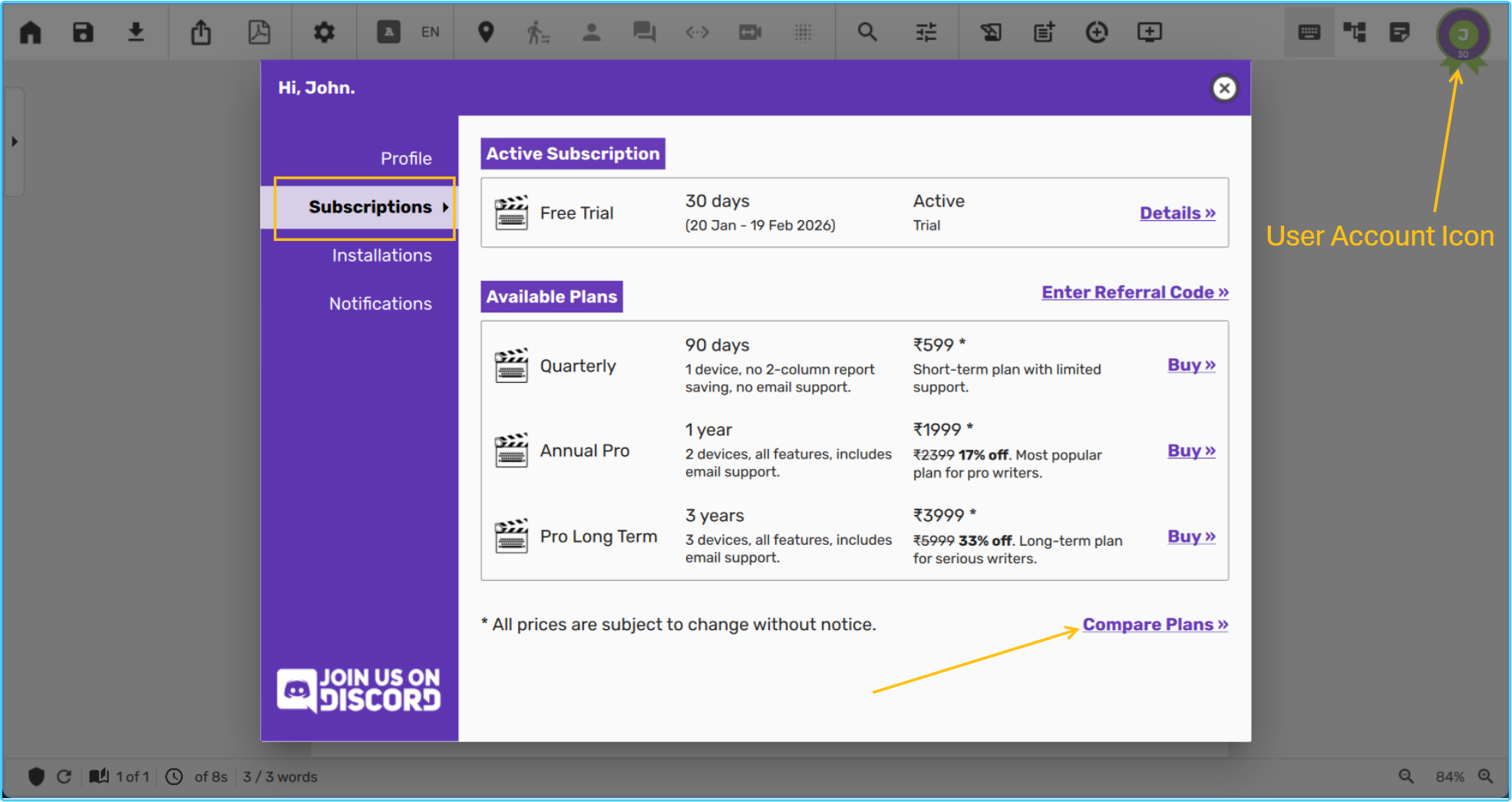
You can click on the “Compare Plans” link towards the bottom right corner of Available Plans box, to pull out a feature comparison table.
Please ensure that you review all features available against each plan before purchasing. Certain premium features are only available in premium priced plans. No cancellation or upgrade is currently offered against any plan.
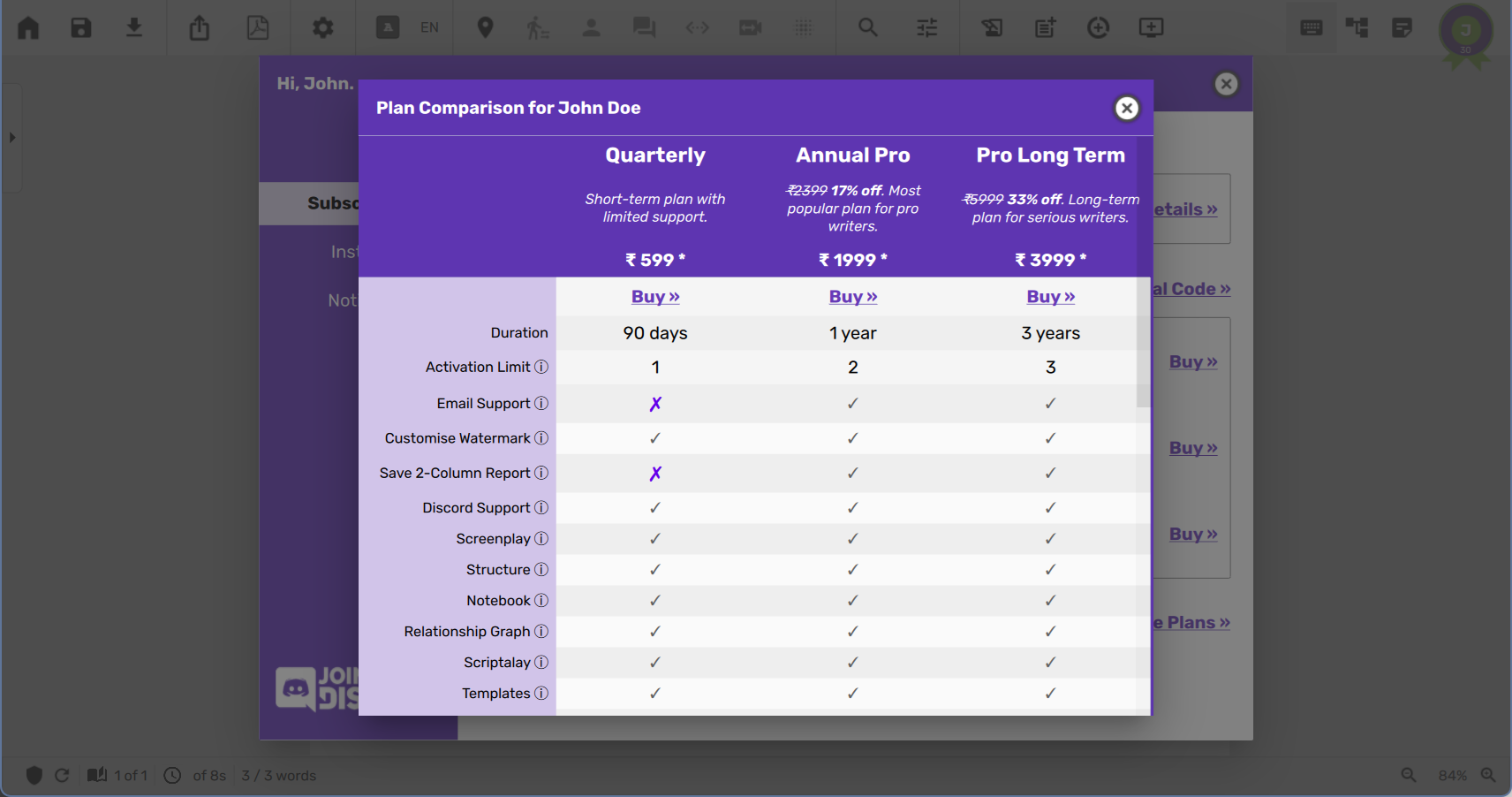
Once you have chosen the plan you want to purchase, click on the Buy link against that plan to open a browser window from where you can pay for the plan. As soon as your payment is received, you will notice confirmation message on the browser window, after which you can switch to the Scrite app and begin using the features purchased in your plan. If you have days remaining in your trial period, the app will continue to display TRIAL on the title bar, but you can use all features from your upcoming paid plan during the remaining period of your trial.
If you run into payment or subscription activation issues, please lookup our FAQ and see if you can find solutions there. You can always reach out to us on email at support@scrite.io for further assistance.