The old adage says a screenplay is a blueprint. Not the building, but the plan for the building. The film is the building. The screenplay is what gets you there.
That’s true. But here’s what the adage leaves out. A blueprint is not organised by pages. It’s organised by components. A wall. A window. A room. Each element exists independently and connects to the others to form something whole.
A screenplay works the same way.
Everything in a screenplay, every scene heading, every line of action, every word of dialogue, exists within a scene. There is nothing in a screenplay that is not part of a scene. Pages are just the way scenes happen to look when you print them out. They are a byproduct of scenes, not the other way around.
When we say a screenplay is a database of scenes, we don’t mean it in an engineering sense. We mean it the way a filmmaker means it when they say “let’s shoot the confrontation scene” and not “let’s shoot pages twelve through eighteen.” We mean it the way a producer means it when they say “the scene where she finds out isn’t working” and not “page forty-seven needs work.” The language of filmmaking has always been scenes. The instinct of most screenwriting software has always been pages.
That gap is what Scrite was built to close.
Everything in a Screenplay Is a Scene
Think about it literally. Every line of a screenplay exists within a scene. A scene is not a unit of a document. It is the fundamental unit of storytelling itself. Films are conceived in scenes, pitched in scenes, shot in scenes, edited in scenes, and remembered in scenes.
A screenplay organised around scenes rather than pages is not a technical choice. It is a storytelling choice, one that aligns the tool with how stories are actually made.
To be clear, none of this asks you to write differently. You still write scene headings, action lines, and dialogue the way you always have. Industry standard formatting still applies. The difference is in how Scrite organises what you write ie. around scenes rather than around pages. The writing process stays the same. The structure around it becomes more useful.
What This Means in Practice
When you write in Scrite, each scene is its own individual block, discrete, movable, and alive with its own information. This changes the writing experience in several concrete ways.
Structure becomes visible
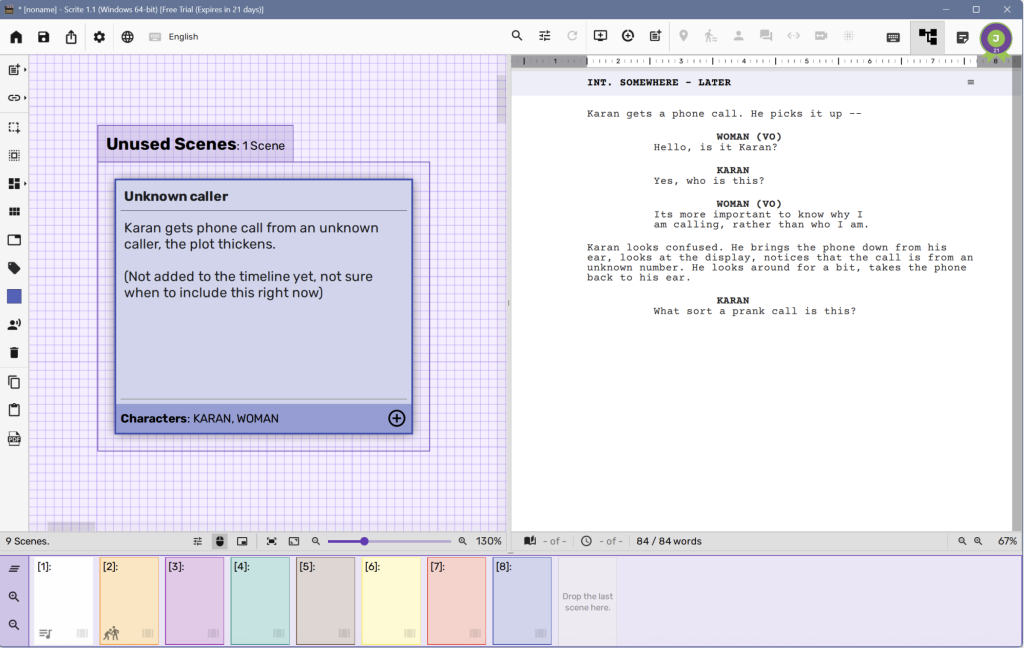
Every scene has an index card. You can see the shape of your entire story at a glance, a bird’s eye view of your narrative that page-centric tools cannot offer. Weak sections of your story become visible before you’ve written yourself into a corner.
What makes this different from a separate outlining tool is that the index card and the scene are the same thing viewed differently. Click a card and you are inside that scene instantly. Change something in the card and the scene reflects it. There is no syncing, no exporting your outline into your screenplay, no managing two separate documents. Structure and writing exist in the same place at the same time.
Write the scene. Scrite remembers the details
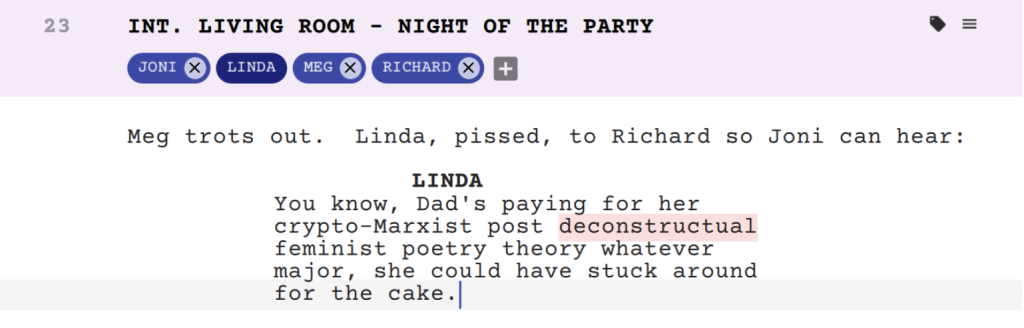
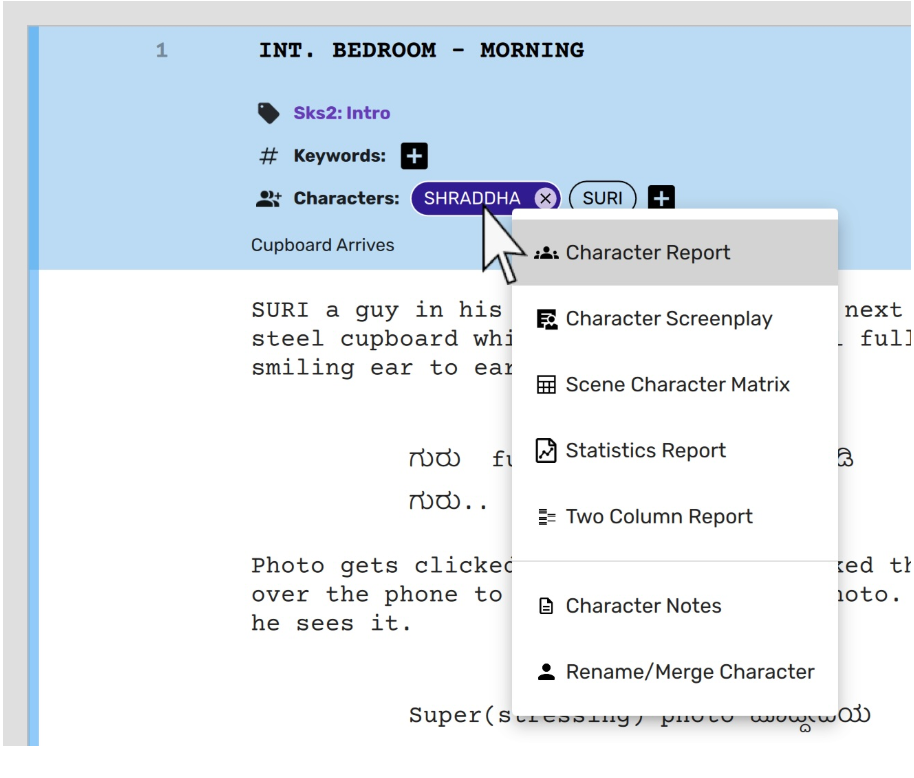
As you write dialogue in a scene, Scrite automatically detects the characters present based on the character names you’ve written. You don’t maintain a separate character list or update a cast document every time someone new appears. The act of writing populates the information automatically.
When you start a new scene and begin typing a character cue, Scrite already knows your characters from the scenes before and suggests them as you type. The screenplay builds its own memory as you write it.
This is one of the quieter but more meaningful consequences of treating a screenplay as a database of scenes rather than a document. In a document, information lives in the text and only in the text. In Scrite, information lives in the structure and becomes available to you in ways the text alone never could.
Each scene carries its own world
Beyond characters, each scene in Scrite carries a layer of information that belongs to it alone.
A synopsis or headline; one line that captures what the scene does dramatically. Not a summary of the action but the dramatic function. “She finds out he lied.” “The plan falls apart.” These headlines sit on your index cards and give you a readable map of your story’s emotional architecture at a glance.
A notes layer where you can capture intentions, alternatives, questions, or reminders against that specific scene without cluttering the screenplay itself. The note belongs to the scene, travels with it when you move it, and disappears from view when you’re writing.
An image layer where you add a reference image attached to each scene for you to communicate a visual idea to the filmmaker or for the director to share with their cinematographer.
Which act the scene belongs to. Which characters are present. Status markers if you want to track which scenes are draft, revised, or locked.
None of this lives separately from your screenplay. It lives inside each scene, exactly where it belongs.
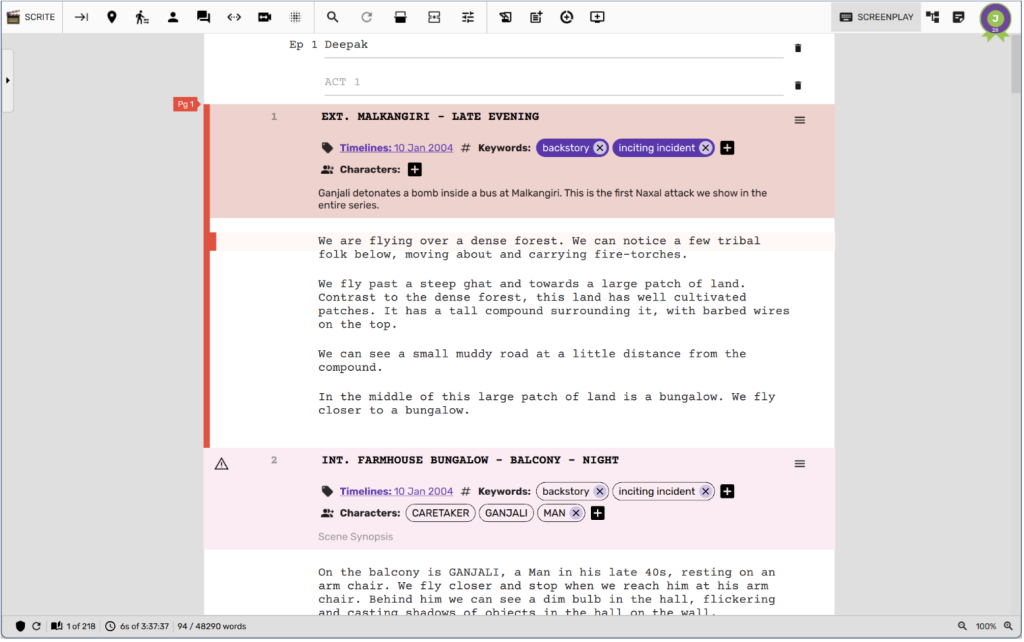
Note: You have the option to hide the character list and scene metadata if you prefer a more distraction-free writing experience.
Outlining becomes non-linear
You don’t have to write from scene one to the last. You can drop in a scene from act three while you’re still figuring out act one. You can write the scenes you know clearly first and fill in the connective tissue later. The structure holds regardless of the order you wrote it in.
Rearranging is equally seamless. In a page-centric tool, moving scenes means cutting and pasting text and hoping the formatting survives. In Scrite you drag an index card. The scene moves. Everything stays intact including its characters, synopsis, notes, and metadata.
For writers who think non-linearly, or who discover their story’s structure through the act of writing rather than before it, this is not a small convenience. It is a fundamentally different relationship with your own screenplay.
Navigation becomes instant
In a long screenplay, finding a specific scene in a page-centric tool means scrolling or searching. In Scrite you jump directly to any scene from the structure view. A 120-scene screenplay is as navigable as a 12-scene one.
This matters more than it sounds. Writers who work on long screenplays or episodic content know the specific frustration of losing track of where something is, of scrolling past twenty pages looking for the scene you need to revise. When your screenplay is a database of scenes, every scene is always exactly one click away.
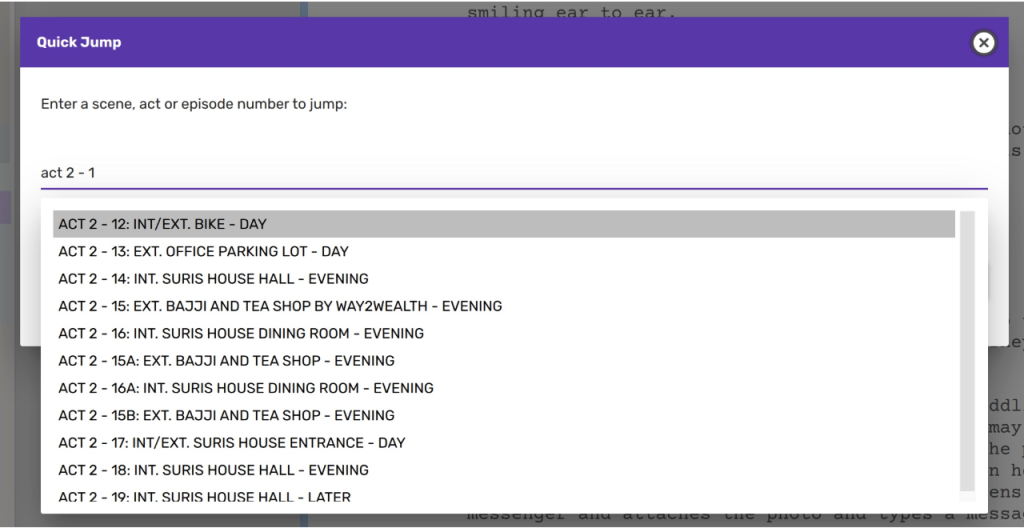
Ctrl+G, type a scene/act/episode, and press Enter to jump to a specific sceneExport exactly what you need
Because Scrite treats your screenplay as a database of scenes, you can extract exactly what you need from it.
Export every scene a specific character appears in. Export only act two as a standalone document. Pull a character’s complete dialogue as a report. Generate a Scene Character Matrix showing which characters appear in which scenes across your entire screenplay, exportable as a PDF or CSV that can be opened in Excel for scheduling and planning purposes.
None of this is possible when your screenplay is just a document. A document gives you everything or nothing. A database of scenes gives you exactly what you ask for.
“But… I write in Pages“
Writers who have spent years measuring progress in pages, as in “I wrote eight pages today,” will notice a shift. The page count instinct is deeply ingrained, and Scrite’s scene-centric view doesn’t lead with pages.
This is a deliberate choice, not an oversight. Scrite does calculate page count and displays approximate page boundaries, so you are not flying blind on length. But the primary measure of progress is scenes, not pages, because scenes are what you are actually building.
For most writers this shift takes a short adjustment period. For many it becomes the reason they don’t go back.
Everything Follows From One Idea
Every one of these features, character detection, scene synopsis, notes, non-linear outlining, instant navigation, targeted export, is a direct consequence of a single architectural decision made when Scrite was designed. A screenplay is not a document. It is a database of scenes. When you build a tool around that idea rather than around pages, everything that follows is different.
Your screenplay has always been a database of scenes. Most tools just never treated it that way.
Scrite does.