From version 2.0, Scrite queries minimum system requirements every time the app is launched. Here are minimum requirements:
- Scrite is currently available only for Desktops & Laptops. We do not yet support mobile phones and tablets.
- Operating System
- Windows 10 or later
- For version 2.x: macOS Catalina (macOS 10.15) or later, and for version 3.x: macOS Ventura (macOS 13.0) or later.
- Ubuntu 22.04 or later.
- CPU: 2 Cores or more
- RAM: 8 GB or more. (Sometimes operating systems report less than 8 GB available even if your hardware has 8 GB RAM. In such cases Scrite will report that minimum RAM is not available.)
- Disk Space: 10 GB or more free space
- Any graphics card with support for OpenGL ES 2.1 support. If graphics hardware is unavailable, you can switch to software rendering and try using the app.
Important: Plan purchases now require Scrite 3.x
You can only buy plans through Scrite version 3.x. We no longer support new plan purchases from version 2.x or earlier.
In a couple of months, version 2.x will stop working entirely. Please upgrade to the latest version as soon as possible.
If any of the above requirements are not met, Scrite shows a dialog box like the one shown below with a list of requirements that were not met.
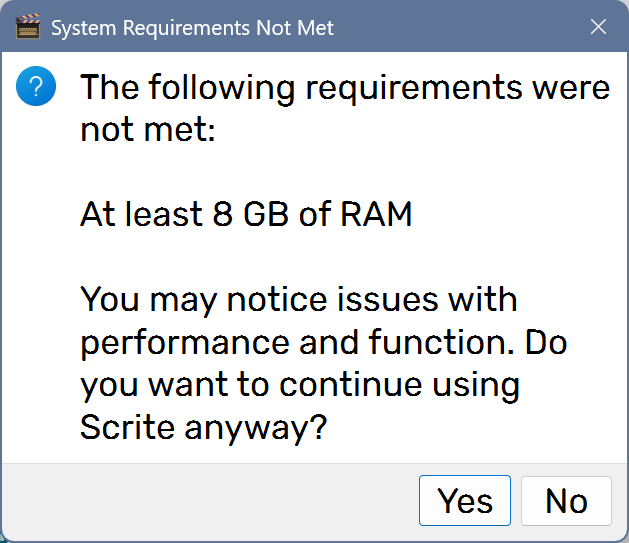
You may click “Yes” to continue using Scrite on the same device, although please note that performance and function may suffer. Its recommended that you switch to another device for best results.
Please use the app in trial before subscribing to ensure that Scrite works on your laptop or desktop.
NOTE: Minimum requirements can change from time to time. While we make best efforts to retain support for older hardware, sometimes we may not be able to do so.