Little more than a month after version 3.0 was released, we release version 3.1. This version is all about stability and bug fixes.
New Features
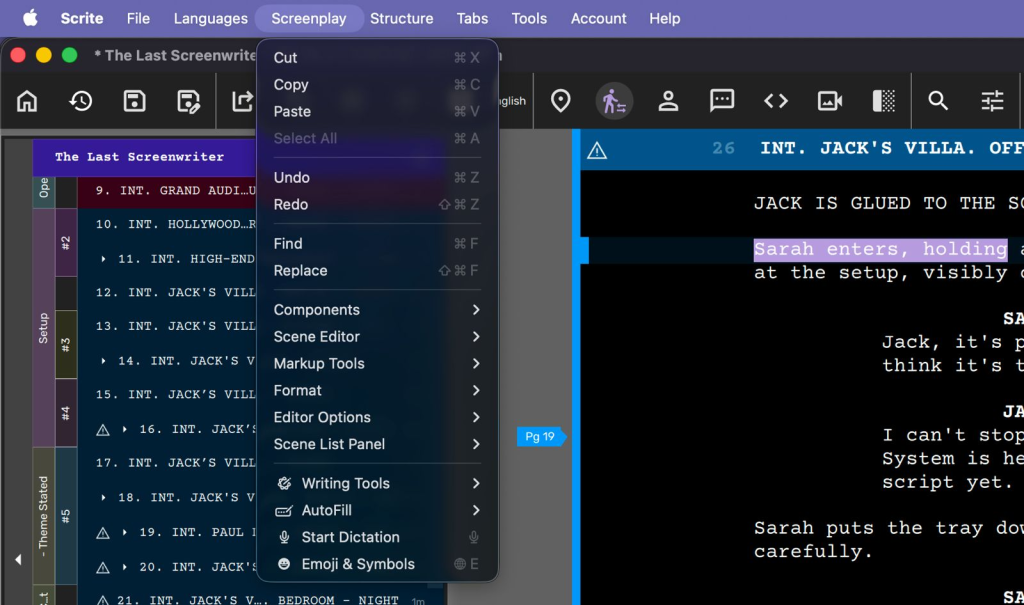
macOS Native Menu Bar
- Native menu bar integration ensuring shortcuts are delivered reliably
- Edit tools appear under Screenplay menu
Structure Canvas & Annotation Improvements
- Perimeter-walking annotation layout implementation
- Improved image annotation rendering and positioning
- Text annotations can now be copied/pasted on structure canvas with Alt+C/Alt+V
Editor Zoom Controls
- Keyboard shortcuts for zoom one and zoom fit operations
- Optional structure canvas zoom-one behavior for current editable index cards (configurable in Settings)
- Part editors are now zoom-aware for balanced UI scaling
DPDP Compliance
- Sign up and registration workflows now requires users to explicitly check consent options.
- User account dialog box offers granular consent checkboxes
Improvements
User Interface & Experience
- Comprehensive UI refinements for visual consistency
- Improved notification message appearance and layout
- Window title now displays upcoming plan name
- Enhanced tooltips for key actions showing associated shortcuts
- Fine-tuned font sizes for synopsis and part editors
- Small index cards now editable regardless of zoom settings
- Improved app startup sequence to prevent empty homescreen
Performance & Optimization
- Improved PDF generation performance. Two column reports are now super-fast!
- Removed debug logs in release builds
- Fixed memory leak and binding loop in screenplay editor font evaluation
Language & Input System
- Fixed corner case where built-in transliterator would use wrong OS input method
- Scene heading transliteration now only available from Indic to English
- Autocapitalization works correctly with Sanscript.js input method
- Return key now correctly changes from character to dialogue paragraph in single press
- Language font change notifications with restart requirement alerts
- Fixed fallback font lists with correct ordering and no duplicates on Windows
- Refactored script-fonts loading using name-based reverse lookup
Export & Document Handling
- PDF exports now use document font for scene type text and Indic scripts
- Final Draft exports no longer bloated for Indic scripts
- HTML exports can bundle fonts upon request
- Fixed export/report folder path capture
Rendering & Visual Elements
- Radio button text rendering improved in dark mode
- MORE & CONTD markers now use document font
- File icons on home screen have fixed sizes
- Undo operations on non-visible scenes now make them visible
- Viewport no longer jumps during whole-scene undo/redo operations
- Original paragraph preserved during undo after copy/paste operations
Structure Canvas & Editing
- Fixed crash when using layout options
- Incase there are selected index cards, layout mode now applies only to selected items (not all items)
- Text completion filter strings properly cleared on selection
Dialogs & Interface Elements
- File format selector hidden when only one format is available
- Path selector properly shown on export dialog
Platform-Specific Fixes
- macOS: Fixed NSSpellChecker hang on macOS 15.x by restoring main thread initialization
- macOS: Updated minimum version requirement to Monterey for Qt 6.11
- macOS: Alt key reference corrected to Option/opt
- macOS: Fixed Scrite menu display on MacBook M1 Air
- Windows: Improved fallback font list ordering and duplicate handling
Settings & Infrastructure
- Fixed platform language detection and Qt version compatibility
- Emoji and dictated text now properly support undo